Intro
Let's discover EpicBot in less than 5 minutes.
Getting Started
Get started by downloading EpicBot from here.
Extract the contents of the archive to your desired location and run the EpicBot application.
Starting EpicBot
- Open EpicBot. This will open up the EpicBot Updater and automatically handle downloading the latest launcher, client and other dependencies for you.
- After updating the EpicBot Launcher will be opened.
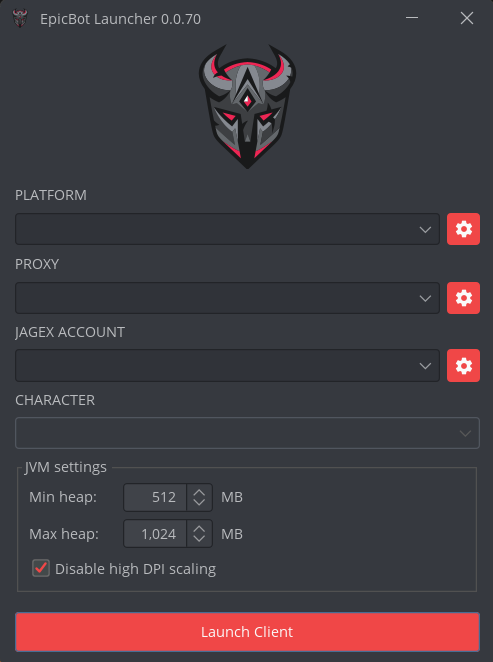
- Configure the launch options and click Launch Client to launch a new bot client.
- Log in with your EpicBot account and you’re ready to start scripts.
- Go to our store to find the scripts!
Platforms
The Platform setting in the EpicBot Launcher allows you to hide or spoof details about the Java Virtual Machine (JVM) that the bot client is running on.
RuneScape checks JVM properties such as version, vendor, and architecture. Using a custom platform ensures that the client appears more like a normal game client, making it harder to detect automated behavior.
This feature is especially useful for advanced users who want to minimize detectable differences between the EpicBot client and the official RuneScape client.
Proxy support
EpicBot supports proxies and they can be added and configured through the launcher.
You can assign a proxy to each client so it connects through a unique IP.
Benefits of using proxies:
- Protects your real IP from being linked to your RuneScape accounts.
- Lets you run multiple accounts at once without them appearing from the same location.
Jagex Accounts
EpicBot has built-in support for the new Jagex Accounts system. This means you can log in with your Jagex account credentials and still run your linked RuneScape characters through EpicBot.
Both Legacy/Standard accounts and Jagex Accounts are supported.
- Jagex accounts can be managed through the launcher.
- Legacy accounts can be managed via the Accounts settings in the client.
EpicBot Files & Troubleshooting
All EpicBot files — including logs, configuration, and cache data — are stored inside the EpicBot folder in your user directory.
You can find the folder here:
C:\Users\<YourUsername>\EpicBot\
/Users/<YourUsername>/EpicBot/
/home/<YourUsername>/EpicBot/
The logs subfolder contains log files that are very useful for troubleshooting problems.
If you run into an issue, check the most recent log file and provide it when needing support.